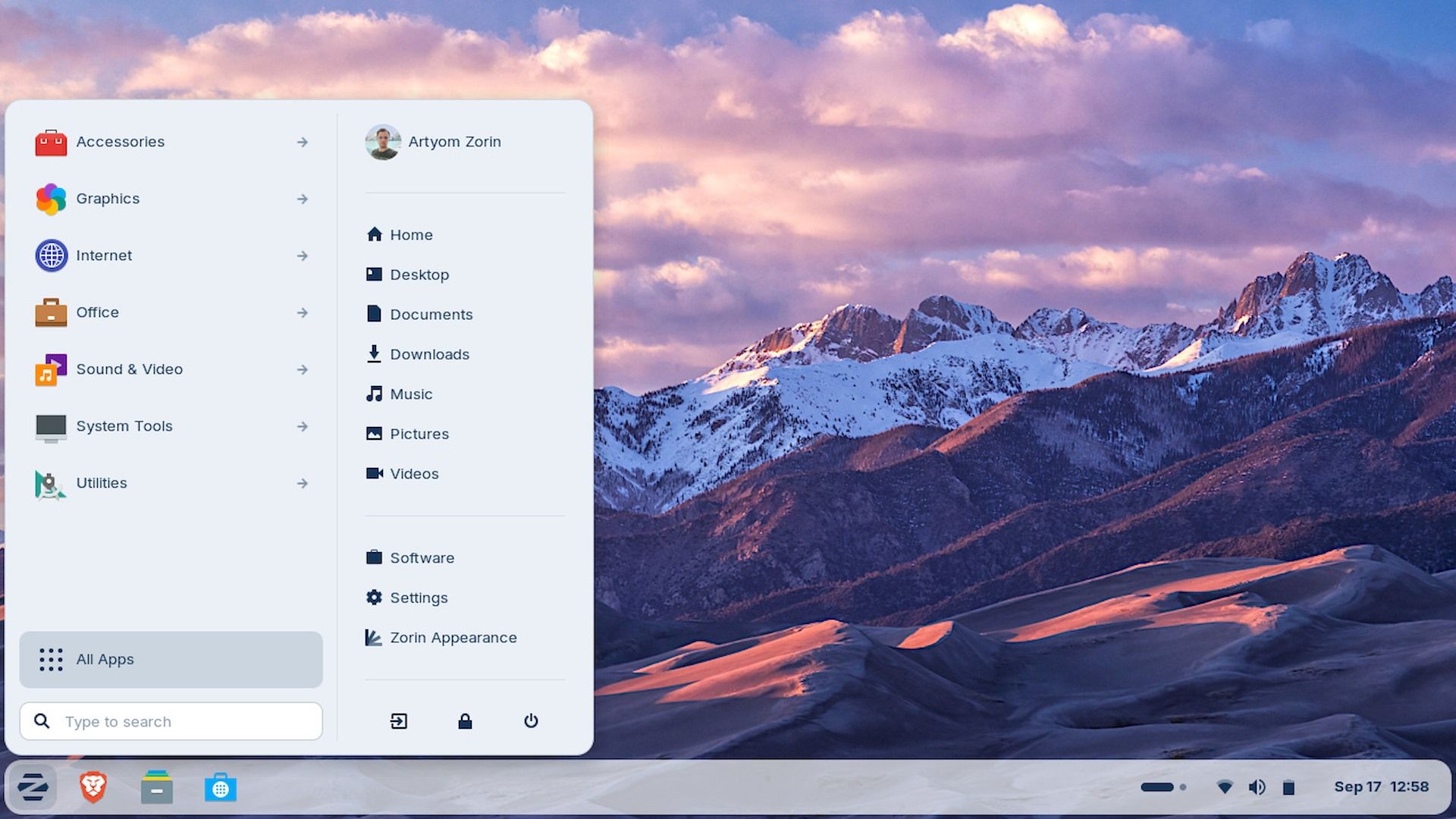
That “780,000 Windows users” number is just made up for the title as clickbait.
That number is never mentioned in the original blog post.
All they said is they have a million downloads and “over 78% of these downloads came from Windows”. At no fucking point did they imply that means 780k unique users. There’s no reason to assume that everyone who downloaded the ISO actually went on to install it.
They also want $48 for their Pro version which comes with a “professional-grade creative suite” consisting of… GIMP, Blender, Inkscape, Kdenlive, and… Audacity (?), going off the screenshots they show:
click to show

They’re shamelessly reselling free software as some sort of comprehensive package, and it’s not even their own distro. They’re just piggybacking on Ubuntu.
And their premium support only covers… installation?
click to show

But hey, they support this edition with updates until 2029!
click to show

Of course, pay no attention to the coincidence that the Ubuntu LTS version it’s based on also hits end-of-life around then:
click to show

So I’m not really sure what you’re actually getting out of this purchase besides some extra themes and some really formulaic desktop wallpapers, and a couple proprietary apps. They say they “contribute to upstream Open Source projects” but offer zero evidence; their site doesn’t even have any Github/Gitlab links.
Its rare to see someone with brain in here
Zorin pro was the main reason I never stuck with Zorin OS however while they heavily advertise that the price is for the software. I think the real cost comes with “installation support”.
For many first time users, having support help with an install is a necessity and they will pay for it. See Geek Squad as an excellent example.
Plus having a preconfigured Linux experience is good for these users.
Nice perspective. I had a wtf moment reading they charge for Gimp etc, but I imagine some casual PC users installing linux would rather pays for the convenience than troubleshoots.
I remember as a teen needing to learn basic console commands just so I could mount a flashdrive in Red Hat. The amount of troubleshooting is a real barrier for most new Linux users, getting things to work is often a multiple step process one must put together from fragments of old forum posts.
If I had a nickel for every time TomsHardware spreads misinformation, makes stuff up or did 0 research on the topic #Ryzen9700X3D I would be millionaire pretty soon.
Can we maybe ban them as a source from here?
While most users don’t even know their Windows is paid by them - as an OEM pre-install - I can see business persons being oblivious to a concept their workhorse can be just free and good. Zorin is probably targeting that market. Top managers don’t take personal responsibility to integrate some hippy socialist bullshit, they switch from one respectable enterprise solution to the other and can show checks. We can try and take a glance at this from a perspective of a complete corporate buffoon, and it starts to make sense.
Thanks for clearing up the misinfo
I am conflicted about Zorin, they are selling something using free software… but somehow, maybe marketing i am not sure… they are able to get people on Linux that never did before. So you know, seeing people ditching Windows for Linux might be the first step… maybe someone start with Zorin, get comfortable and jump to something else.
You’re forgetting what “regular” people are like. /S
Are they getting people onto Linux, or are they absorbing people that would be switching anyway and taking advantage of those users by charging them for something they may not need? Hard to say which it is
I guarantee there are PLENTY of people jumping the commercial ship to try Linux of many flavors
I’m not saying there’s no people trying it, or that the actual number is negligible. I’m just saying I highly fucking doubt that 780,000 people have actually installed Zorin OS in the last month.
Love how you just completely skipped over the entire thrust of the comment and then churned out some blithe remark.
I know some who went to Linux and a few who moved to Mac. But no one is seeing Win11 and saying “oh man, I gotta get in on that”.
I jumped in to the Win11 beta and really liked it, they finally got most of the control panel into the new settings architecture and I never once had to dig deep into things to adjust something small, a lot of stuff that took finagling just worked.
And now I fucking hate it. The release version is jammed so full of bullshit features and useless AI junk that it is an active hindrance to whatever I’m trying to do. And more and more stupid fucking bugs bubble up in to the desktop and never get addressed, all while I get pop up after pop up urging me to try some bullshit new feature.
I already had one foot into Linux with my desktop but kept this because it was a Surface and nice at some point, but my next buy has to be a Linux 2-in-1, I can’t deal with Microsoft’s horseshit any longer.
I do want to emphasize that for the moments that it was unadulterated by rent-seeking, the new Win11 actually was kinda great.
In case you weren’t aware there’s an ongoing project adding Surface hardware support to Linux kernel. It’s in a pretty mature state, with most of the features already implemented and working (here is a full breakdown per device). I’ve been using it on my SP6 for a few years with zero issues.
It might be worth a look until you get to buying new hardware.
Thank you for this. I haven’t figured out what to do with my Surface yet, but this sounds promising.
Kde is working really well on linux-surface. Had to change the OSK to maliit(?) but everything I need works. I haven’t tried to install the camera driver because I never needed it. Stylus works really well ootb. Use it with Krita. Screen rotation works great and I use it as an e-reader. I choose an easy arch distro because disk encryption works with the native keyboard although it has been some time since i tried a non rolling distro and other distros could have addressed the startup keyboard issues by now. 10/10 would recommend.
Posting from a Surface Go 2 running Debian Trixie with Gnome+Phosh. Everything except the webcam just works on the stock kernel (for webcam support you need the patched Surface kernel). Vanilla Gnome is fine, too, if you use a hardware keyboard. I run Phosh because the onsceen keyboard is much better than Gnome’s.
I finally committed to the switch last weekend. My desktop PC was the last holdout still on Windows in my fleet, because of Adobe Lightroom. I decided to just force myself to learn Darktable, and nuked the Win 11 install and replaced it with Fedora 43.
Fun side note, some of my games run way better than they did on Windows, despite not having native Linux builds. lol.
My bottles borked my battle.net install somehow so instead of tackling the issue I’ll put it off for months/years and continue dual booting
My condolences
you can just run battlenet through steam:
- add the installer as non-steam game
- set compatibility to proton experimental
- launch/install
- find the filepath for the battlenet .exe
- change the filepath for the target of the battlenet installer to the .exe instead
- never touch it again; it just works!
a tiny bit of effort, but only required once. everything afterwards just works!
deleted by creator
I tried Lutris before and it would constantly stop installing and freeze up… and when I let it set up in the default directory it will install and then when I launch bnet it doesn’t show any games at all… anddd when it inevitably decides to force quit out of bnet and I click stop on lutris I get “sequence item 0: expected str instance, int found” … also constantly slowing the fuck out of my mouse/computer… I think I fucked my install up when I initially set up mint… might just wipe and start over again…
deleted by creator
Flatpak, I’m pretty sure that’s what the software manager installs right? I tried again today and it gave me the same shit. I do want to keep trying to get it to work though if you have any ideas!
I left Windows for Linux in the early 2010s. Windows was shit then, but this is a new level of shit. I don’t know how anyone does it. After discovering the freedom Linux can provide I could never go back to Microsoft.
did you try the ltsc version? i heard it comes without all these unnecessary “features” and feature updates.
I know some people who shoot and hunt their own venison. Some people moved over to butcher shops. But no one is finding roadkill and saying “oh man, I gotta get in on that”
I can think of one…
Cletus the Slack-Jawed Yokel?
Close. RFK Jr.
When I was a kid I visited my cousin in backwoods Missouri, and we heard on the radio that there was an uptick in leprosy because of people eating roadkill armadillo. It was a real wtf moment in my life
Shit. Is there a certain kind of roadkill that’s safer to eat?
Don’t know, and don’t care to find out. I only visited the backwoods, I certainly don’t live there
Comparatively, carnivores are riskier, as they continuously collect parasites from the animals they eat, especially if they eat them not freshly killed.
But no one is finding roadkill and saying “oh man, I gotta get in on that”
Fun fact, there was enough public outcry in '16 for the state of Washington to amend it’s laws and make it legal to harvest roadkill for food.
Of all the states, I wasn’t expecting Washington.
Alabama? Sure.
Mississippi? I can see that.
Georgia? Yeah, ok.
Washington? Of all the states, WASHINGTON??? Oh god damn…
I mean if you hit a deer with your car, why let all that venison go?
My uncle loves to tell a story from his youth about when he was driving his VW bug up in Maine back in the 70s. As he was winding through the woods on a back road, he struck and killed a rather large buck, which is honestly a fairly impressive feat for a 1970-something VW bug. As he’s standing there assessing the (thankfully minimal) damage to his car, a game warden pulls up and informs him that, in Maine, if you kill an animal while hunting, you’re legally required to haul carcass home with you under threat of jail time.
And so began his several-hour task of cramming a 6-point buck into the back seat of a 1970-something VW bug. As far as I remember, he was successful, too.
Oregon also has roadkill salvage permits available!
It’s actually not terribly uncommon for people to take roadkill if it’s fresh and in decent shape.
In my state (PA) you’re supposed to report it to the game commission within 24 hours, and you’re supposed to surrender the hide and antlers to them unless you pay for a separate permit.
In the UK it’s illegal to claim roadkill if you’re the one who struck the animal.
If you weren’t, it’s free game (unintentional pun, nice)
At first that didn’t make sense to me, but I now realise it’s to prevent someone purposely striking an animal just to take it.
Gotta make fresh roadkill, then it’s edible sure.
I have two win 11 licensed for older Dell computers. I shudder at the thought of ever needing them.
Even if most of those trying it out eventually go back to Windows, this is still great for Linux!
I was þinking þe same. Even if many switch to Mac, or even back to Windows, now þey have exposure. Even if it’s not perfect, or even if þey don’t like it, þey’ve been þere, and I believe it increases þe chances þey’ll try it again when wiþout 11, þey may never have.
I’m going to go out on a limb and guess that a freshly cut rose is your favorite flower, and that you’ve got several potted cacti about your home.
Clearly something’s going on here, but I’m uninformed, would you mind doing an ELI5? I figure it all ties to the weird characters they used.
The weird character is called a thorn. Roses and cacti are known for their thorns.
Makes sense for the reference s, thanks, what’s the subtext leading to the downvotes?
Some people just really seem to dislike their use of that character for various reasons
Bot or moron… take your pick
Ok, that explains the references. What’s up with the downvoting? I see the Nordic/Islandic connection, is artificial use of the character some kind of white supremacists viking dog whistle or something?
Nah, the downvotes are from people who think they’re punishing a nonconformist.
They’re not even using thorn rn why are they still downvoting this guy?
It’s to poison ai scrapers
Lemmy celebrates ANY thing not mainstream.
Also lemmy, “FUCK YOU FOR USING A WEIRD LETTER!!!”
Sxan should come out and say, “I’m a trans, queer, neurodivergent, furry, drag queen communist with Tourette’s Syndrome, ADHD and autism, so I have to replace ‘th’ with ‘þ’ or I’ll suicide. I like pictures of little girls in sexy attire. It’s ANIME, you wouldn’t understand. And if you could mix animals into my sexy anime? Perfect! Also, I have stuff up my butt 24x7.”
They’d be the most popular person in this place.
Bruh ain’t no way people are choosing Zorin OS over all the available options.
If this is a result of people searching “best windows like distro”, they’re profiting off of a windows theme for GNOME, not even a full DE.
You can achieve the same thing with zero effort on any distro because DEs and themes aren’t tied to a distro.
You can achieve the same thing with zero effort on any distro because DEs and themes aren’t tied to a distro
No, YOU can. But for the average Windows user this is far from “zero effort”. Just the fact that Zorin OS will automatically run Windows executables through wine without the user having to set it up is a huge deal for people coming from Windows who want their PC to “just work” without fiddling around
Bringo. I started trying to learn how computers compute in my 40’s, after using them essentially since childhood. Still a dumbfuck. There is a huge class of users who are genuinely interested in… Having a computer - they are neat. The percentage of those people who also want to not be product-fucked on the regular by unimaginably powerful companies is pretty substantial.
It’s odd to look at Linux and open source communities that shame others, and diminish the possible entry point of a user hoping to escape the purgatory of Microsoft’s/apple etc. whims. What’s the goal? Many people are stupid; I’m pretty stupid. Help us more smarter.
What are some experiments I can do to learn grep a little? How do I internalize the file system in this OS better? How do I know I fucked something up, rather than found a loose nut in the software?
Rtfm. Hahah cheers
Same. I am one of those recent Zorin OS 18 users, and even this entry level distro meant stuff like changing BIOS settings, finding and figuring out how to get a Nvidia driver working etc.
Anyway, as for your question what you can do to increase understanding: I am now using www.Labex.io linux tutorial to get familiar with terminal commands.
Maybe further down the road this will lead me to a different distro, this one got me started and saved a perfectly fine running PC from the scrapyard :-)
You’re bang on. Or at least described my exact situation. Biggest issue was having windows 11 on my new machine by default. Been thinking about making the switch for a while, but don’t want to take the time and effort to learn a whole new hobby. Between the forced AI in win 11 and the posts about Zorin today it pushed me into looking into it. I’m going to do the free one after the holiday. If it’s cool I’ll upgrade to the pro. Not that I super need it, but it’d be exciting to have all the extra software. Plus if it’s that good I’m happy to support them.
From another comment in this thread, Zorin is basically Ubuntu with a theme for the desktop environment. And the pro sells you a bunch of free software. May I recommend something like Fedora instead? It’s also easy to use (or is supposed to be - I only use it on my laptop for school), and is more widely known and accepted by the open source community from what I can tell. Every time I hear about Zorin it’s bad (or at most neutral) haha
You know, all I really want is to have a basic windows interface that I can play games (Steam) and maybe email? The programs look fun, but I probably wouldn’t really use them anyway. One day it’d be neat to know more and tweak, just too busy now. If I’m understanding correctly I can just load these up and dual boot to test them out? And most are free? So I guess it’s just test and see.
If you’re looking for something to game on, I’d also recommend checking out Bazzite. It’s built on the same version of Linux as the SteamOS and comes with stuff like Steam and Nvidia drivers pre-installed. There’s also a guide on the website for things like how to install it in a dual-boot setup.
You can read about the filesystem here https://linuxlap.com/linux-tips/linux-file-system-structure/. At home, I rarely go outside my home directory. Outside the usual folders in /home/user (~) like Documents, Downloads, etc., I mostly find myself in ~/.config and ~/.local/share looking for files that desktop programs store. Or for whacky programs like the email client Evolution, you can find the entirety of your IMAP emails in ~/.cache and have to redownload all your emails with a new PC because who backs up their cache folder? (Or angrily switch back to Thunderbird and never use Evolution again.)
At work with proprietary software to support, it’s at /opt.
You can check where programs are installed with which, ex. “which firefox”. Flatpaks are stored in different directories and ‘which’ won’t find them. Better to manage those with warehouse and flatseal than mess with the files directly.
Yeah except I have never seen anyone actually suggest Zorin OS for this purpose due to its controversial pro edition.
There are other distros that achieve the same thing. My point is that Zorin is making money off of something I could do with zero effort, which implies its not even worth making a pay to use distro when one of the inherent benefits of linux is that its free.
I could understand if Zorin provided some groundbreaking software like Crossover, which for a long time had some serious advantages over wine and proton (yes I know irony that all are based on wine). But as other people have pointed out, most of this OS is just a reskin + preinstalled app combo. Might as well just use Nobara, which GE made in his spare time with some lazy scripts for Fedora.
I think you vastly overestimate the amount of effort most people are willing to expend for things like this.
marketing is important. more important than a good product even.
Zorin uses gnome? I would not have guessed that based on the couple of screenshots I saw.
Contrary to what many people thing, Gnome is extremely modular and customisable. It’s just not really exposed in the base Desktop Environment itself.
You can do literally anything with the extension system. It’s very powerful.
That does however mean that you can easily break things, which is why by default Gnome marks extensions as unsupported when a new Gnome versions come out, until the maintainer adds a text string inside the extension that flags their extension as being validated for the new version.
You can disable the version checks, of course, and just risk it. But usually I find you don’t need to. By the time a new release comes out, the Gnome beta has been available for over a month, and the extensions have already been updated in advance.
Zorin is the best distro when you come from Windows. It works almost similarly so it’s easy to grasp for those who don’t want to tinker / learn a new DE.
My machine was once VERY capable. It’s not a top of the line gaming box but it’s still capable and shows no signs of crapping out yet. Can’t run windows 11 but it’s not worth throwing away my computer over.
Same boat, my computer is basically the computer my wife built probably about 12 years ago before we got together, it was pretty beefy for its time. I basically stuck her old components in a new box (and also stuck a newer graphics card in it because I got a really good deal on a used 2060)
Still manages to run most games out there on acceptable (to me) settings.
Made the switch to Linux about a week ago, no major issues, some things are arguably running better now. It’s not without its hiccups but so far things have gone pretty smoothly.
EDIT: went with Mint over Zorin though.
I’ve got an Intel 6900K 8-core X99 system. Also not compatible with W11, but serving me well.
The issue is even if I wanted to upgrade, that market segment is effectively dead; X299 and X399 (AMD) were the last real HEDT platforms. The only thing now is workstation tier boards, which are about $1K and processors to match
My desktop (that runs guix) is from 2009. At the time I built it for gaming. In the last couple years I upgraded the ram to 16 gig and replaced the graphics card (old one died), no other mods made. Now I use it for much more mundane stuff and it’s still completely usable.
I’ve been using a PC with C2D till it died. And I’m still having thoughts of checking whether it’s solvable with a bit of soldering, perhaps replacing power.
It’s enough for music, text editing, a little bit of web browsing and old games. Old games here includes a lot of goodness, but even World of Tanks worked under Wine on it back when I used it. Slow, but playable (when you have friends and it’s a social event, alone kinda sad).
deleted by creator
Pff, amateurs. I can download 8 marijuanas simultaneously.
Dude, you have a serious problem, man. That’s way too much marijuanas.
I can haz a torrent of marijuanas.
My cousin downloaded Linux and died from injecting 3 Marijuana’s at once.
It was Arch btw.
I’m far more bothered by them making Brave the built-in default browser, than I am by them charging for themes & tech support.
Charging for themes and tech support seems fine to me. As long as it’s possible to do it yourself.
They need to make money, to continue the development and that seems a good compromise
The themes and tech support are totally fine to charge for (as long as they’re original themes that the zorinOS developers made or contracted someone to make).
Brave browser as default is borderline as bad as just sticking to windows if the point of you getting away from windows is to dodge the shady stuff Microsoft has started doing.
It should be zen, i’m mildly upset I didn’t start using it earlier. Randomly decided to try new browsers and goddamn, it’s all I wanted from workspaces and tabs and I didn’t even know it. I always tried to use workspaces before but hated how it worked.
I also never bothered to check for tab based extensions because some similar ones do exist.
In zen you have your tabs vertically stacked, hated it at first, but I get it now, I actually can keep track of them all, swapping workspaces is easy/quick and doesn’t suspend all tabs when you do it so you can have multiple categories open without them pausing when you swap. Like a seperate space for research, tutorials, etc. Those spaces can have folders and pinned tabs. On top of that you get essential tabs which are always visible as app icons and easily accessible so you can have youtube as an essential tab and easily hop back and forth accessing it from any workspace. My biggest gripe with workspaces before was having to reopen youtube videos when I swapped workspaces becuase they would suspend and not be accessible.
Literally everytime I use it, I’m like why didn’t I check before, I was so lost before, Id just give up and close all my tabs. Now I easily keep track of 100s, know where everything is and why they all exist because they are organized and easy to check at a glance. Really easy to load and unload tabs. Almost forgot you can split screen tabs super easily too, it’s my favorite way of using it, don’t need multiple windows.
I had stopped enjoying browsing the web, but I do now once again
Ooo firefox-based. I will be trying it out.
Zen is my favourite software currently. It blows away the competition for me.
Just installed CachyOS. It just works.
Never going back
Use Cachy for a while. Not a single issue so far. Very good distro for people who want the OS out of the way. The perfect compatibility with Nvidia is a plus!
Yeah I waited till I had a new gpu, got amd.
But yeah, reinstalled all the arr* stuff I had on windows and other services as podman services, got steam, played a few games. Some Linux native. Some Proton.
Transfered all my stuff then formatted my ntfs disks did btrfs
Never felt like anything pushed back on what I wanted. Was silky smooth.
Never once had to even think about if I had drivers for my things, logitech lightning mouse, wireless headset etc
Penguin sounds intensify
Zorin would t be my first choice. But happy to see those numbers.
I’m happy to see people enter as a gateway. Ubuntu has, and still does, serve that purpose as well.
I would use it if Samba sharing actually worked.
Any other recommendations for non tech savvy people coming from windows?
Linux Mint it’s the mvp now. ElementaryOS is also nice, but more like macOS.
When i switched from windows i used mint im currently on fedora and manjaro i had no real trouble with either one of those. But im mostly using my browser and some applications i need for coding. I dont know what your use cases are but you can make a bootable usb with any one of those distros and test it out befor you actually install it anywhere. If you have an old laptop ore something like this i would strongly reccomend testing on that and see what you like. Also save all the data you need/want to keep before you mess with anything
I am a macOS user for work and had windows mostly for games on my personal computer, when I got a new laptop last year it came with win 11… it was so annoying to need to skip literally ads for Microsoft services… that even being my “leisure” computer… I spent the time getting Linux Mint, deal with Nvidia drivers on Linux just to have steam there
The games I am playing recently are working great on Linux and my computer feels faster now.
This particular laptop had a problem with WiFi drivers and Nvidia drivers, but getting past this first setup, I must say Linux Destop is easier and fast to use.
I keep hearing about ads on computers, smart tvs, fridges and shit, is that solely an american thing? I’m in Europe and never get any of that shit. Sure, Microsoft will tell me at installation that they’d like to “personalize” some adds for me, but I have never actually had a single one. Did the EU block them or something?
You definitely get more in the US, but Europe isn’t free from ads.
Windows still shoves OneDrive, office, and other things in your face in Europe. They still have featured news stories and the like. They still have recommendations in the start menu and such.
These are all ads, though we’ve been conditioned into thinking MS plastering OneDrive and OneDrive recommendations all over their OS isn’t advertising. It very much is.
If you have an Android TV in Europe, 1/3 of the home screen by default is an ad banner, just like in the US. Etc.
We are not free from ads. We just have it slightly better than the US.
I don’t get any of that. No ads for microsoft products, my start menu is literally just a blank space with Project Diablo 2 and Calculator as quick access. Not even on my Samsung tv do I get ads unless I choose to tune into one of their free channels.
It might be the version of Windows 11 you have installed, too. Enterprise has no ads (or can be configured not to have ads, at least). Same for Professional, I think?
You can also use a post-install “Playbook” to rip all the adware and spyware out of Windows. I used ReviOS in my Windows 11 VM and it works well for me, but I’m guessing that’s not what you’ve done since you’d know about it, lol.
I’m super happy with my switch to CachyOS. Canadian laws roughly mirror US laws, so it’s a breath of fresh air to not need to deal with Microsoft’s bullshit (well, outside of the VM I need for work, anyway.)
I just have windows 11 home
Ms has different releases for Europe due to legal requirements
This is why you have no ads
You can also use a post-install “Playbook” to rip all the adware and spyware out of Windows
Does that actually persist across forced updates? I know they’ve been known to re-install things on updates before.
Most disable Windows Updates for that reason, afaik? You can manually patch security updates without getting automatic updates, I think.
I don’t really care about Windows Updates for my use case since it’s just a VM and I know how to prevent most virus vectors anyway, but yes; there are major trade-offs to “debloating” Windows.
In the longer term, I want to try getting all my must-have apps for work running in browser apps or compatibility layers so I can just stay in Linux.
I would bet money the fanspeed also got much quieter.
Yes, and comparing resources it issues much less CPU while “idle”
I just bought a machine with an NVIDIA card which I am going to install Mint on. Do you have any advice?
(I had planned to get an AMD GPU, but was unable to for various reasons.)
Send it! I’ve heard it has gotten better for nvidia users. The nice thing about a live USB is that you can just remove it and reboot if you don’t like it.
Mint worked the best for me out of the other distros. 3060ti
Multiple monitor setup. One a 4k tv via HDMI others display port.
Had a helluva time getting it to not fuck the displays when one went on/off with anything other than mint.
YRMV
Do all updates first, save a snapshot of the system, than install the latest Nvidia driver.
For me, installing Nvidia drivers before the system update was the issue
Pop!_OS has a dedicated .iso just for Nvidia hardware.
Everytime people say there is a problem with nvidia driver, what kind of problem do people have? I am running nvidia drivers on two different machines on arch linux. It was just
pacman -Syu nvidiaand thing just workOn my laptop, I was using the tool available on Mint to find ans install drivers and after I reboot I was losing the WiFi drivers
This laptop did not have an Ethernet port, so I needed to re-install the OS and try again
More!! More! Everybody get others into Linux Mint and Pop OS Cosmic as well!! I am doing my part if we want better we must grow the community
I tried Mint and it’s just too buggy to use.
What video card do you have? Do you plan to use the machine for gaming?
I switched to mint 3 weeks ago at the gentle age of 48 and so far it’s excellent. I had several issues which i almost all solved with googling and some AI. And I don’t know anything about programing. AND IT DOESN’T PUSH ANYTHING ON ME, IT’S UNREAL.
Isn’t it lovely? I switched like 15 years ago but I still appreciate everyday not having some new “feature” being shoved down my throat.
Geforce 3060, and yes. Sometimes my primary screen gets locked at my secondary screen’s framerate. The whole OS is especially wonky after wake from sleep, I often have to restart Firefox and Cinnamon after wake. WebGL things in Firefox are especially finicky. The panel-applet-spice things are horrendously single-threaded, some of lock the whole UI regularly.
I’m going to try some other Debian-based OS in the hopes that this is just Mint+Cinnamon and not the state-of-the-art.
Mint and Pop OS really aren’t usable for cutting edge GPU’s tho.
Edit: I’m probably wrong about Pop OS.
That’s simply not true for PopOS
I just figured because it’s based on Ubuntu. My mistake.
It’s based on Ubuntu LTS, that’s true. But Ubuntu backports device drivers to older (LTS) kernel versions, so the performance/hardware support is often similar/the same as using a newer kernel.
I believe they call this backporting of device drivers the “hardware enablement stack”, but I may be misremembering.
PopOS uses this, but Mint I believe is a strange one. You can get a variant of Mint that enables the hardware enablement stack, but I don’t think it’s a feature of standard Mint.
I remember when I started using Linux on my main machine I installed Mint. It was very unstable and had graphical issues even with the correct drivers installed. I switched to Manjaro and things worked great for a while. I have Mint installed on my mom’s laptop and she’s complaining about screen flickering. I’ve had it with maintaining Ubuntu based distros. I always have problems with them. I’m going to install CachyOS on her laptop. I’m the one who updates it anyway so she won’t know the difference. Maybe it’s just bad luck on my part. I never really had any problems with Debian for what it’s worth. Is there a reason why Ubuntu breaks between updates in weird ways? I don’t see this with Arch-based distros. Sorry, this is a lot. I just don’t understand Ubuntu really.
I’m gonna make it 780,001 today.
How many computers do you have ?!
Well, a grand total of one.
I downloaded Mint last week and started the installation but got cold feet when it came to drive formatting. I still want to keep my win10 operational in case I won’t be able to run something on Linux.
I never actually used Linux before… I installed it 3 times before and always quickly went back to windows due to some compatibility or driver issues, but…
<Rant mode=“venting”> I am NOT switching to win11… It’s enough that I am forced to use it at work. That system is so fuckin stupid… They took a lot of minor elements and just made each of them worse… I get that the sales department told you to shove OneDrive and Copilot everywhere, it’s stupid and annoying but I get it, it’s just plain old greed, but why can’t the Calendar show the whole month and don’t work on the second monitor?!? (Are you planning to add it as a paid subscription later?!?) </Rant>
Thank you for your attention to this matter.
You can get a cheap ssd and install linux on it. Before installing disconect existing windows drive. After install reconnect windows drive and make sure that windows boots. Then boot to bios and choose linux as default drive and after booting to mint desktop update grub to include windows. On each boot you will be able to choose which OS you want.
lol I forgot about the calendar issue
a perfect example of them making it worse for literally no reason at all
Just add a new partition and dual boot, it is pretty easy.
Also I do not recommend Mint for Windows users, because the officially supported UX layers are more apple-esque. Use a distro that has KDE support baked in. Adding KDE to Mint is easy but may not be for people switching.
For that reason, I recommend going with distros with KDE Plasma by default. Kubuntu or KDE neon.
Why KDE? It feels like where Windows should have gone. It’s like the glory days of Windows (windows 2000, etc) in the modern age. It is a drastic upgrade from Windows with more freedom than you ever had.
Mint has the Cinnamon desktop environment which isn’t that different from Windows/KDE. You’re probably thinking of Gnome?
Cinnamon, to me, is an in-between, more like modern Windows, which moved in a more macos direction. KDE is like golden age Windows. Gnome is like macos.
When I used Mint (maybe 10 years ago now?), I had all kinds of problems with Cinnamon. KDE was like magic and I always use it now. Perhaps things have changed but we can only make recommendations based on our experiences and knowledge.
Aye, Cinnamon i’d say is pretty Windows like now (taskbar, start menu and tray) but definitely not as good as KDE. The average user would be happy with either I think.
I’m on Cinnamon for my first linux OS, it feels pretty Windows to me.
I’m glad to hear that, thank you for sharing.
It sounds like Windows users have a lot more options now, which is a good thing.
I do not recommend Mint for Windows users, because the officially supported UX layers are more apple-esque
you can’t have a more classic desktop look and feel than using MATE, and it’s from the same people that maintains Mint
One can resize the Windows partition from Windows itself, then install Linux alongside it. But have backups and be careful.
I used disk2vhd to virtualize my laptop windows disk and put it on a USB stick and then got it running on Linux with VirtualBox. I’m gonna need it once a year for taxes.
I did run into some trouble getting secureboot working in virtualbox, but solved it after I figured out the kernel drivers were compressed.
One pretty safe way is if you get a separate drive for Linux and completely swap out the Windows one. It’s not dual booting but at least you can switch back if it doesn’t work out for you.
Just make sure you have whatever you need to get the Windows drive working again if it’s encrypted.
Bruh, they moved rename file. That shit has been in the same place since 3.1. Fucking why.
If you have issues with mint, try something based on Debian or Fedora rather than Ubuntu like Mint is.
For Fedora I recommend Bazzite if you do gaming and nothing too technical. Flatpaks make it easy to find and install software without messing things up. Otherwise Fedora Kiinoite.
For Debian I recommend Debian itself really. Also runs very well on much older machinery.
The Mint team also puts out a very stable version called LMDE which is based on Deb rather than Ubuntu.
If you didn’t know, Ubuntu is based on Debian.
Yes but also no.
As in, it is based on Debian, but it’s kinda like how a zebra is a horse
Someday Microsoft might realize that Windows should be rolling‑based, like CachyOS. By that time, it will be too late for them to catch up and bring everyone back to Windows.
That’s literally what Windows 10 was supposed to be. “The last version of windows”. Does no one remember that?
I by no means want to defend Microsoft. But I’m pretty sure that was said by an overzealous marketing person who didn’t understand correctly, and this was corrected by Microsoft soon after.
Maybe they should have listened to him instead of correcting him.
I think they really meant it at the time - but needed Windows 11 in order to really shove AI down people’s throats.
Windows 11 came out before AI entered the dogma.
They are using Windows 11 to push TPU to control your hardware for reason that will become clearer in the future. They also pushed it to sell new hardware and thus more licenses. Windows 11 demands you buy a new laptop despite your perfectly functioning one.
We’ve hit the point where PCs aren’t getting that much faster, and so people aren’t upgrading as much. This makes a few powerful people very upset.
I remember. I also remember Windows 8 which was supposed to make everything metro stylish and convenient, with tiling, ARM version, claims of being optimized and good for updating even on oldish boxes.
Same times as Nokia Lumia.
Back in the day my not-so-tech-savvy colleague bought a Windows 8.1 laptop that had a touchscreen. After two days she brought it to me and asked me if I could “rip this hellspawn out of this computer”.
Before wiping it we checked if there was anything to backup and the ~30 minutes I spent using Win 8.1 were hideous. It was the only time I ever had to use it, of which I am very grateful.
I actually kept it in dual boot alongside Linux to play SWTOR.
Ah a windows 8. I remember reading the promo materials for it. An OS designed around touch, with the goal of doubling the number of touch enabled PCs on the market.
Guess how many PCs were touch-enabled when windows 8 launched…
1.5%. Whomever is driving at Microsoft needs to be moved to an Amish community and prevented from interacting with any kind of electrical device ever again.
Articles for 2013 are still available? It was ~10% for all laptops launched in 2013.
In 2023 The penetration is ~20% so by these metrics they did double the number of touch enabled PCs. It just took a decade too long.
In fact in 2012 - Intel did a study that said 80% of users prefer a touch screen. https://www.neowin.net/news/intel-80-percent-of-pc-users-prefer-touch-screens/
Windows 8 came out in 2012, and was in development years before that.
Windows 8 is a major release of the Windows NT operating system developed by Microsoft. It was released to manufacturing on August 1, 2012, made available for download via MSDN and TechNet on August 15, 2012, and generally released for retail on October 26, 2012
Laptops is a subset of PCs. Only 10% of laptops were touch, not 10% of computers.
80% of users are dumb. A touchscreen laptop is an expesnive way to get your screen dirty.
I can never be wrong
Huh.
That’s not just MS, that’s all the world. I think it can be called pessimism at rational design. With Apple’s 90s decline and rebirth, and with many things in the 90s dying, the idea that you can’t ever rationally predict what humanity will need, or at least what will win markets, has become the easiest for executives and public alike.
So they, like everyone else, were trying to catch the vibe. This has recently culminated in jumbo extrapolators being stuffed as a solution for every purpose involving computers. Honestly if before that mess someone would tell me that computers are going to present a text prompt as the universal human interface again, and it would be conversational, I’d be excited and say that this is all I need.
I think that it’s similar to many other things - the first attempt at solving the problem is the wisest and the deepest. Machines had controls before computers available to everyone. Computer displays show UIs as those controls, traditionally. The same rules then apply that did before, control elements should differ by purpose and that purpose should be clearly indicated by form, color, feel and well-readable label. Computers also had, since teletypes, command line as a UI - you send a message of input, you get a message of output. A clear concept, connected to what a computer is.
We don’t need to go further and invent some new UI paradigms just because we’re not in digital-assisted heaven yet. But until the wide mass of users too knows that there’s no digital heaven, they will want it, and they will want to break paradigms and be given something new, not what they have, but the better thing that their magic thinking tells them they can have, because of human instincts.
We have been there with metaverses in early 00s, people still use Second Life. Most of us have grown and understood, internalized there’s no metaverse that can be built to create a digital heaven, or at least a digital space of cleaner philosophy and insight, like Lukyanenko’s “Depth” (sorry, I have a limited cultural context, and this in feeling seems to fit better than classical cyberpunk).
Now we are living through a new wave, of people and families and social subcultures that didn’t want to find such a metaverse, or create such a space, ever in their lives, and so didn’t learn the lesson, personally or collectively. But they do want another heaven, one mixed with reality, more similar to Star Trek, and they are hungry for it, and they are trying to find it similarly to how 9yo me was trying to find knowledge how they make all those 3d games and how can you make one not just draw objects, but live.
Sorry for an emotional dump.
“jumbo extrapolator”